
Turn what you have into something worth opening.
Sendset turns spreadsheet rows, pasted text, photographed pages and photos into one clear page made for the phone in someone’s hand. You check it before anyone else sees it, then send it by link, email, message, print, or PDF.
Four Sendsets, made from four different piles of information.
All four are real and open in a new tab. Nothing here is a mock-up.

Ellison & Co.
Offsite Venue Options
Five venues compared, with the three worth touring first.
The Foundry at Mill Street · Harborlight Loft · Cedar & Vine · +4 more
Open it →
Harbor House Hotel
Welcome to Harbor House
What guests come to the desk to ask, then where the desk actually sends them.
Wi-Fi · Breakfast · Parking · +6 more
Open it →
Bell Strength
Month One
A month of sessions, read one-handed between sets.
The warm-up, both days · Goblet squat · Dumbbell bench press · +6 more
Open it →
The Red Awning
Today's Menu
A small business sending its own prices, changed the morning it changed.
Birria · Carnitas · Pollo asado · +6 more
Open it →Different jobs, one thing underneath: a set of items with photos, details, links and notes, laid out to be read on a phone. Whether you gathered the information for someone else or it was yours to begin with.
The information was already useful. It just wasn’t in a useful shape.
| Exercise | Sets | Reps | Rest | Start with |
|---|---|---|---|---|
| Goblet squat | 3 | 8 | 90 sec | 35 lb |
| Dumbbell bench press | 3 | 10 | 90 sec | 25 lb each |
| Overhead press | 3 | 8 | 90 sec | 20 lb each |
| Split squat | 2 | 10 each side | 60 sec | Bodyweight |
Four columns, cut off at the edge. No photograph of the movement, and nowhere for the one note the trainer wanted read.
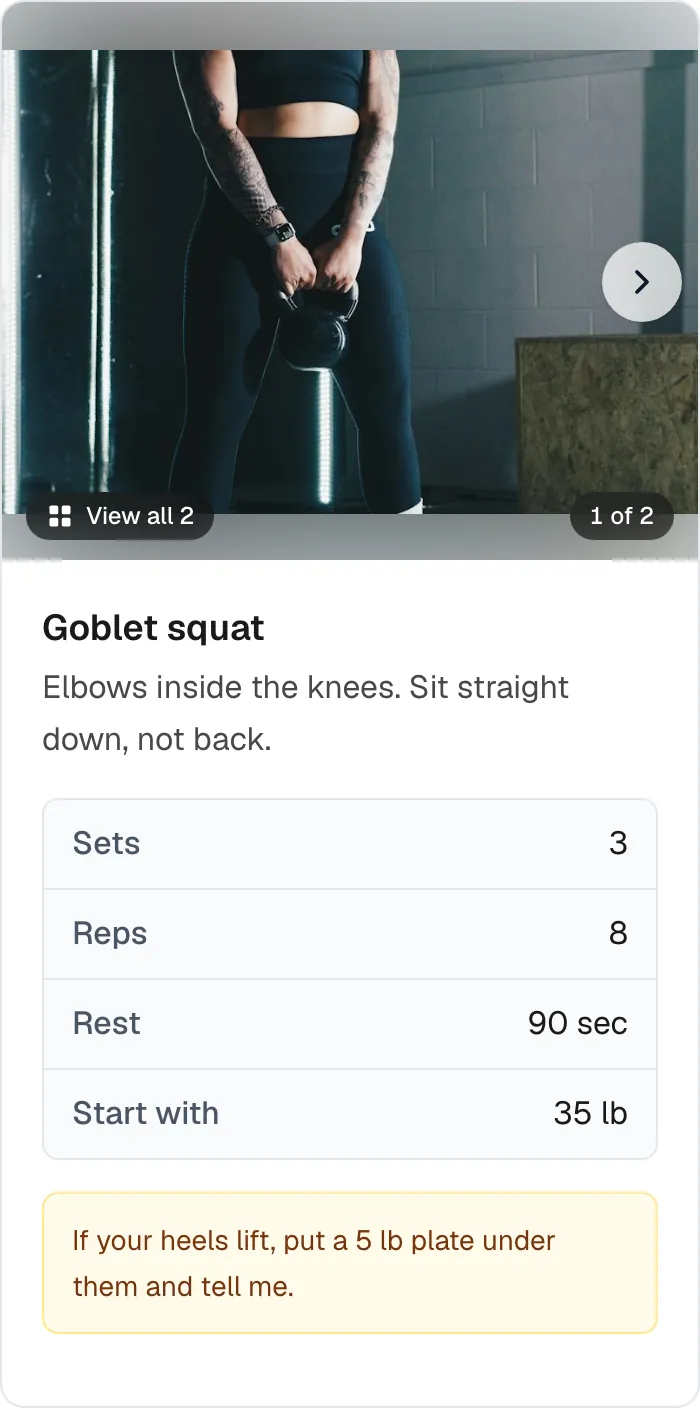
Both panels are the same Day A, read out of the same Sendset: the rows on the left, and what the first of them becomes on the right. Open the whole month.
Three steps
- 1
Bring in what you have.
Paste your text, open a CSV, photograph the pages you were handed, or pull items from your Library. Pictures are transcribed into the same box, where you can correct the words before anything is organized. It doesn’t need to be tidy.
- 2
Read the draft, and change what needs changing.
It comes back organized into sections. Fix a price, drop an option, add a photo, write a personal note at the top. Anything Sendset has asked you to look at, you settle here. You see all of it before anyone else does.
- 3
Send something people can actually use.
One link that opens into a clean, mobile-friendly Sendset. Text it, email it, or open it yourself while you’re out.
You stay in the middle. Sendset works from the material you give it — your words, your source material — and organizes it into a draft. That draft opens in an editor, and nothing reaches anyone until you’ve read it, corrected anything that’s off, and decided it’s right. When Sendset spots something that needs your attention, it asks you to review it before you send.
Build it once. Use it again.
The things you put into a Sendset don’t have to disappear when you send it.
Save a venue, a property, a vendor, a dish, an exercise — anything you’ll reach for again — to your Library. Next time, pick what belongs and put it in order instead of rebuilding it.
No perfect database required. The Library fills up as you work.
Made for the phone in their hand.
Useful information almost never gets opened at a desk.
It’s opened while touring a house. Walking a market. Standing outside a food truck. Looking for dinner near the hotel. Deciding something with family. Or trying to remember the next exercise.
A Sendset is built for that moment — big enough to read, quick to scan, with the photo, the address and the details where a thumb can reach them.
One Sendset. Share it the way that suits.
A link is the simplest way, and a text is usually the best one — it opens right where they are. Sendset writes the message for you; you edit it and send it.

When email, print or PDF suits better, the same Sendset comes out in those too. Nothing to rebuild, and no second version in the world: update it, and the link you already sent shows the current one.
Start with one you really have to send.
The fastest way to judge it is to build one — the Sendset you’d otherwise assemble by hand this week.
Sendset is new, and built by one person. If you try it and something doesn’t fit how you work, I’d genuinely like to hear it.